binwalk
介绍
binwalk可以用于扫描文件中是否包含有隐藏文件并将其提取出来,常用指令如:
扫描文件:
自动提取隐藏文件(提取字节流):
自动提取指定格式文件(推荐):
1
|
binwalk -e abc.png --dd='png'
|
foremost
介绍
相较于binwalk,foremost更注重于隐藏文件的提取,效果也更好一些,使用之前可能需要先使用apt进行安装
1
|
sudo apt install foremost
|
常用命令:
1
|
putforemost file.bin -t png -o out
|
其中:-i指定输入文件,-o指定输出目录(必须是空目录),-t只提取指定类型
例题:deskpng
使用binwalk扫描确定包含有隐藏文件,遂使用foremost提取:
1
|
foremost desk.png -t png -o out
|
得到flag为:flag{your_journey_to_hacking_starts_here}
Robot36
介绍
SSTV 慢扫描电视是一种图片转音频技术,常用在无线电等情境下,例如气象卫星向船只发送气象图等。
建议使用手机版
例题:来自银河的信号
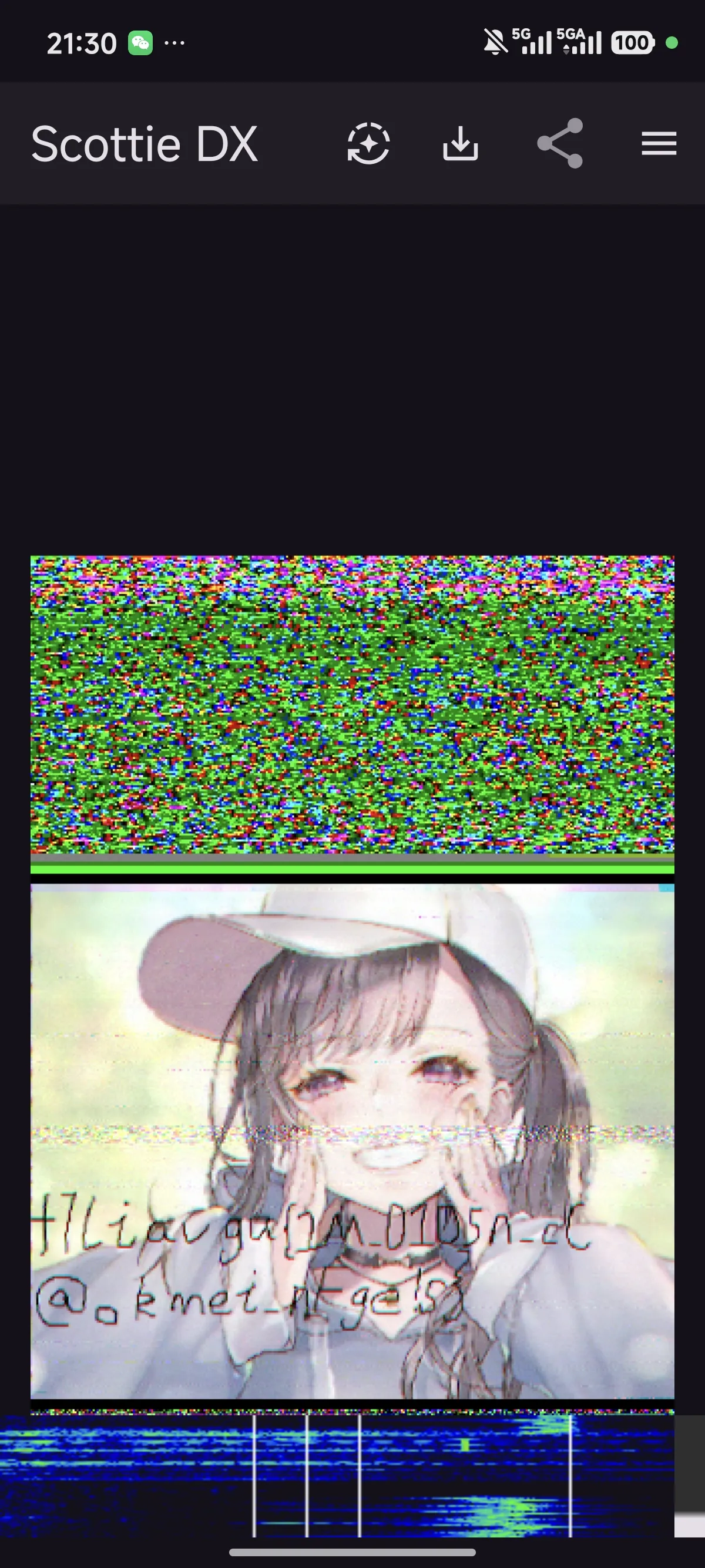
目视得到字符串f7liavga{1M_0105n_cC@okmei_nFge!s}
对其进行栅栏密码解密,当每组字符数为17时可得flag为flag{M00nc@ke_Fes7iva1_15_Coming!}
可用下面的脚本跑一下:
  1
  2
  3
  4
  5
  6
  7
  8
  9
 10
 11
 12
 13
 14
 15
 16
 17
 18
 19
 20
 21
 22
 23
 24
 25
 26
 27
 28
 29
 30
 31
 32
 33
 34
 35
 36
 37
 38
 39
 40
 41
 42
 43
 44
 45
 46
 47
 48
 49
 50
 51
 52
 53
 54
 55
 56
 57
 58
 59
 60
 61
 62
 63
 64
 65
 66
 67
 68
 69
 70
 71
 72
 73
 74
 75
 76
 77
 78
 79
 80
 81
 82
 83
 84
 85
 86
 87
 88
 89
 90
 91
 92
 93
 94
 95
 96
 97
 98
 99
100
101
102
103
104
105
106
107
108
109
110
111
112
113
114
115
116
|
def rail_fence_by_rows(ciphertext, key_rows):
    """
    按行数(传统栅栏密码)解密(锯齿形排列)
    :param ciphertext: 密文字符串
    :param key_rows: 行数/栏数
    :return: 明文
    """
    if not ciphertext or key_rows < 2:
        return ""

    # 构建字符对应的行位置模板
    rail_pattern = []
    current_row = 0
    direction = 1  # 1=向下,-1=向上

    for _ in range(len(ciphertext)):
        rail_pattern.append(current_row)
        if current_row == 0:
            direction = 1
        elif current_row == key_rows - 1:
            direction = -1
        current_row += direction

    # 按行分组密文
    rows = [[] for _ in range(key_rows)]
    idx = 0
    for row in range(key_rows):
        count = rail_pattern.count(row)
        rows[row] = list(ciphertext[idx:idx+count])
        idx += count

    # 还原明文
    plaintext = []
    for row in rail_pattern:
        plaintext.append(rows[row].pop(0))

    return ''.join(plaintext)

def rail_fence_by_group_length(ciphertext, group_length):
    """
    按每组字数(分组长度)解密(在线工具常用)
    :param ciphertext: 密文字符串
    :param group_length: 每组的字符数(比如17)
    :return: 明文
    """
    if not ciphertext or group_length < 2:
        return ""

    # 步骤1:将密文按group_length分组(最后一组不足则补位不影响核心)
    groups = []
    for i in range(0, len(ciphertext), group_length):
        group = ciphertext[i:i+group_length]
        groups.append(group)

    # 步骤2:按列读取每组字符(核心逻辑)
    plaintext = []
    max_group_len = max(len(g) for g in groups) if groups else 0
    for col in range(max_group_len):
        for group in groups:
            if col < len(group):
                plaintext.append(group[col])

    return ''.join(plaintext)

def find_flag_universal(ciphertext):
    """
    通用解密函数:同时尝试按行数、按每组字数解密,优先找flag开头结果
    :param ciphertext: 密文字符串
    """
    print(f"待解密密文:{ciphertext}")
    print("=" * 70)

    # 1. 尝试按每组字数解密(重点:17,同时遍历2-30)
    print("【方式1:按每组字数解密(在线工具常用)】")
    match_found = False
    # 优先试17(你提到的关键值)
    res_17 = rail_fence_by_group_length(ciphertext, 17)
    if len(res_17) >= 4 and res_17[:4] == "flag":
        print(f"✅ 每组17字解密结果:{res_17}")
        match_found = True
    else:
        print(f"🔍 每组17字解密结果:{res_17}")

    # 遍历2-30组字数,找flag开头
    if not match_found:
        print("\n🔍 遍历每组字数2-30(找flag开头):")
        for gl in range(2, 31):
            res = rail_fence_by_group_length(ciphertext, gl)
            if len(res) >= 4 and res[:4] == "flag":
                print(f"   每组{gl}字:{res}")
                match_found = True

    print("=" * 70)
    # 2. 尝试按行数(传统栅栏)解密(遍历2-30行)
    if not match_found:
        print("【方式2:按传统栅栏行数解密】")
        for row in range(2, 31):
            res = rail_fence_by_rows(ciphertext, row)
            if len(res) >= 4 and res[:4] == "flag":
                print(f"✅ 行数{row}解密结果:{res}")
                match_found = True

    # 最终结果提示
    if not match_found:
        print("❌ 未找到以flag开头的解密结果")
    return match_found

# 主程序入口
if __name__ == "__main__":
    # 输入密文(请准确粘贴你要解密的内容)
    cipher_input = input("请输入需要解密的密文字符串:").strip()

    if not cipher_input:
        print("❌ 输入不能为空!")
    else:
        find_flag_universal(cipher_input)
|
ZipCracker
介绍
ZipCracker是一个用python语言写的zip工具,集成了伪加密修复和字典爆破的功能,使用方法也很简单:
伪加密识别及修复:
1
|
python3 ZipCracker.py test01.zip
|
暴力破解-内置字典:
1
|
python3 ZipCracker.py test02.zip
|
暴力破解-自定义字典:
1
|
python3 ZipCracker.py test02.zip YourDict.txt
|
项目地址:GitHub - asaotomo/ZipCracke
例题:fakezip
在大部分情况下,目前的解压软件已经集成了伪加密修复功能,所以直接双击打开文件即可
得到flag为flag{39281de6-fe64-11ea-adc1-0242ac120002}
SNOW.EXE
介绍
snow是一种将内容转为ASSCI码并写在文件末尾的文本形式,由于这类文件用记事本打开后通常会有大段空格或空行,所以亦称为“空白隐写法”。而snow,exe则是针对这种隐写法的加解密工具,这里我们只介绍解密的使用方法:
1
|
snow.exe -C -p 密码 解密文件.txt
|
例题:雪
下载得到snow123.txt,因此猜测密码即为snow123,故执行命令:
1
|
snow.exe -C -p snow123 snow123.txt
|
得到flag为:flag{welcome_to_yzu_ctf_adventure}
隐形水印工具
介绍
这种隐写使用的是叫做“盲水印”的技术,可在不影响视觉观感的情况下给图片加上水印,通常用于资产保护。
例题:watermark
在工具中打开图片即可
得flag为:flag{curiosity_is_the_key_to_success}
不过一般情况下盲水印的题目会给两张图片,只不过这里的只给了一张图片并且没有隐藏文件包含,有点奇怪。